
Language models#
Model selection#
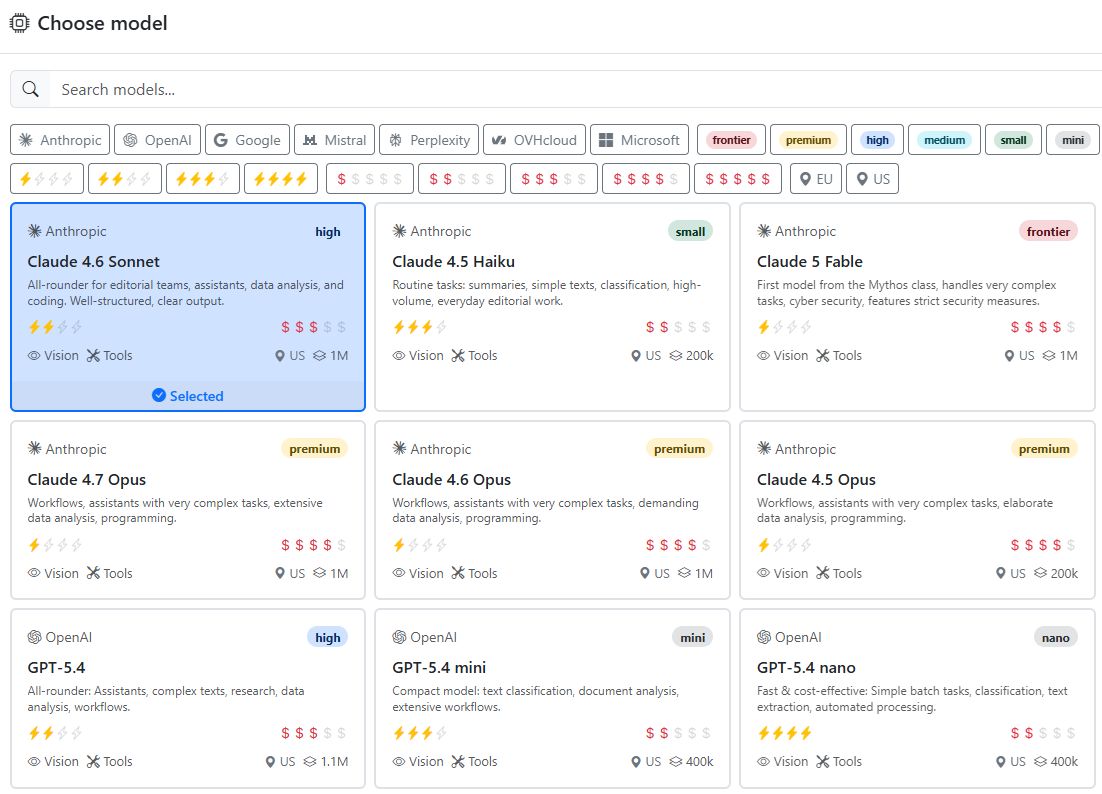
For assistants and workflows, you can choose which language model (LLM) you want to use for the task. Which models are displayed depends on what your administrator has booked. Radio Creator AI-Tools currently support models from OpenAI/Azure, Anthropic, Google, Mistral, and Perplexity.
In addition, you can add AI models provided by vendors in Europe. For example, the open models GPT-OSS and Qwen from OVHcloud in France. This allows you to complete tasks in compliance with data protection requirements in Europe without needing to transfer data to the US or other regions.
We provide additional open models such as DeepSeek, Kimi, and GLM via the infrastructure of Microsoft and Fireworks AI. Requests to these models may also be processed on servers outside Europe.
The model card always indicates where the servers are located.
Model properties#
Not all models can use tools such as “Visit websites” or “Create charts”. Some models can process uploaded images and, for example, extract text from them.
So you can see all model capabilities and properties at a glance, the model selection includes a detailed model card for each model.
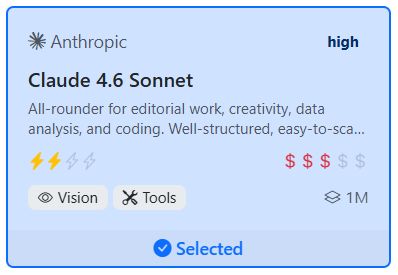
The card shows the AI provider and the name of the model along with a short description. The symbols on the card have the following meaning:
Performance class#

To help you compare models from different providers more easily, we have grouped them into performance classes. These classes are sorted in descending order from frontier (flagship models, very expensive and slow) to nano (for simple tasks, fast, inexpensive):
frontier, premium, high, medium, small, mini, nano.
For most editorial tasks, models in the high performance class are perfectly sufficient.
For simple tasks that are performed very frequently, models in the medium to nano performance classes are the best choice. Use a mini model, for example, to assign keywords to a text or categorize the sentiment of a social media post.
You only need premium models for very complex analyses or for assistants that use many tools or orchestrate other assistants. They are also useful in software development for planning and revising code.
Speed#

The yellow lightning bolts on the model card indicate a model’s speed. The more lightning bolts, the faster the model.
We have classified model speed using one to four lightning bolts.
Cost#

The cost of a model depends on its capabilities. frontier models are the most expensive, followed by premium and high models.
The more dollar signs shown on the model card, the more expensive the model is. Models are classified using one to five dollar signs.
Score |
Symbol |
Output price / 1M tokens |
|---|---|---|
1 |
$ |
< $1 |
2 |
$$ |
$1 - $6 |
3 |
$$$ |
$6 - $20 |
4 |
$$$$ |
$20 - $60 |
5 |
$$$$$ |
> $60 |
AI providers usually state their prices per one million tokens. Output tokens are generally significantly more expensive than input tokens.
However, even a medium model can incur high costs if you use it in a very long chat.
Note: Every time you send a message in a chat, the entire chat (meaning all previous messages) is sent to the AI as input. So if you have a long chat, or if the chat contains long PDF files or analysis data, the number of tokens used can increase quickly. Pressing Enter just once can easily cost 10 euros or more.
Context window#
The context window indicates how many tokens the model can process at the same time. On the model card, you will find the value in the bottom right corner: 1 M, 400 k, 128 k…
Current AI models usually have a context window of one million tokens (1M). That is about 750,000 words or 3,000 pages of text. However, studies show that even context windows filled to 40% can lead to a significant drop in performance.
Tip
Do not let your chats get too long. Instead of reusing the same chat from your history over and over again, start a new chat instead.
If you still need the context from a previous chat:
Have the assistant summarize the most important information from the previous chat and copy it into a new chat. The results are often better, the chat runs faster, and the costs are significantly lower.
Searching and filtering models#
At the top of the model selection, you will see a search field. There, you can enter the name of a model to find it quickly. Or you can enter a term that appears in a model description, for example “text” or “analysis”.

Below the search field, you will find filters. These let you filter the models by their properties, for example to show only models in the medium performance class, models from a specific provider, or models in a certain speed category.
Model overview#
The following tables provide an overview of all supported models and their capabilities.
Note
Vision - The model can process uploaded images (e.g. extract text from images).
Tools - The model can use tools such as “Visit websites” or “Create charts”.
Thinking - The model has advanced reasoning: it internally thinks through the task before responding.
Knowledge - The model contains information up to the date shown.
✓ = available
OpenAI#
Model |
Description |
Vision |
Tools |
Thinking |
Knowledge |
|---|---|---|---|---|---|
GPT-5.5 (premium, agents, expensive) |
Premium model for complex tasks, analyses, and software development. Context: 1 million tokens. |
✓ |
✓ |
✓ |
Dec. 2025 |
GPT-5.4 (code, agents, complex tasks) |
Very good for complex tasks, analyses, and software development. Context: 1 million tokens. |
✓ |
✓ |
✓ |
Aug. 2025 |
GPT-5.2 (code, agents) |
Improved version of GPT-5.1. Very good for complex tasks and software development. Requires precise prompts. |
✓ |
✓ |
✓ |
Aug. 2025 |
GPT-5.1 (code, agents) |
The most powerful OpenAI model in the 5.x series. Very good for complex tasks and software development. Requires precise prompts. |
✓ |
✓ |
✓ |
Oct. 2024 |
GPT-5 (text, code) |
Powerful model. Internally switches to deep reasoning when needed. Context: 400,000 tokens. Priced like GPT-4 Omni. |
✓ |
✓ |
✓ |
Oct. 2024 |
GPT-5 Chat (text, outdated) |
Cannot use tools. Context: 400,000 tokens. |
✓ |
Sep. 2024 |
||
GPT-5 mini (text) |
Fast version of GPT-5. Context: 400,000 tokens. |
✓ |
✓ |
✓ |
May 2024 |
GPT-5 nano (text) |
Very fast and affordable. Context: 400,000 tokens. |
✓ |
✓ |
✓ |
May 2024 |
GPT-4.1 (text) |
Very large context window: 1 million tokens. 20% cheaper than GPT-4 Omni. |
✓ |
✓ |
Jun. 2024 |
|
GPT-4 Omni (text, outdated) |
Powerful model for professional applications. |
✓ |
✓ |
Oct. 2023 |
|
GPT-4 Omni Search (research, outdated) |
GPT-4 Omni with automatic web search on every request. Cannot use tools. |
Oct. 2023 |
|||
GPT-4 Omni mini |
Fast - the little brother of GPT-4 Omni. |
✓ |
✓ |
Oct. 2023 |
|
o3 mini (outdated) |
Small reasoning model with advanced thinking. Very fast. Half the price of GPT-4 Omni. |
✓ |
✓ |
Oct. 2023 |
|
o1 mini (outdated) |
Optimized for deep reasoning. Suitable for complex planning tasks. Cannot use tools. |
✓ |
Oct. 2023 |
Anthropic#
All Anthropic models have built-in web search.
Model |
Description |
Vision |
Tools |
Thinking |
Knowledge |
|---|---|---|---|---|---|
Claude Opus 4.8 (complex tasks, agents, programming, expensive) |
For complex workflows, agents, and software development. |
✓ |
✓ |
✓ |
Jan. 2026 |
Claude Opus 4.7 (complex tasks, agents, programming, expensive) |
For complex workflows, agents, and software development. Uses up to 40% more tokens than Opus 4.6. The Temperature setting is no longer supported starting with this model. |
✓ |
✓ |
✓ |
Jan. 2026 |
Claude Opus 4.6 (complex tasks, agents, programming) |
For complex workflows, agents, and software development. |
✓ |
✓ |
✓ |
May 2025 |
Claude Opus 4.5 (complex tasks, agents) |
For complex workflows and agents. Token prices are almost twice as high as for Claude Sonnet 4.5. |
✓ |
✓ |
✓ |
May 2025 |
Claude Sonnet 4.6 (text, code) |
Powerful Anthropic model. Very good for code generation and text. Follows instructions very well. |
✓ |
✓ |
✓ |
May 2025 |
Claude Sonnet 4.5 (reports, code, agents) |
Powerful Anthropic model. Very good for code generation and text. |
✓ |
✓ |
✓ |
Jan. 2025 |
Claude Haiku 4.5 (fast, affordable) |
Small and fast model. Reaches almost the level of Claude Sonnet 4. |
✓ |
✓ |
✓ |
Feb. 2025 |
Claude Sonnet 4 (text, reports, code) |
Good for code generation and text. |
✓ |
✓ |
✓ |
Oct. 2024 |
Google#
With Google’s Gemini models, you can use Google AI Search. All models can recognize and process input images.
Model |
Description |
Vision |
Tools |
Thinking |
Knowledge |
|---|---|---|---|---|---|
Gemini 3.1 Pro (text, thinking, code) |
Google’s most powerful model. Complex reasoning, creative writing, research, agents, data analysis, programming. Up to 1 million input tokens. |
✓ |
✓ |
✓ |
Jan. 2025 |
Gemini 3.5 Flash (text, thinking, code) |
Powerful all-rounder: summaries, document analysis, daily editorial workflows, agents, data analysis, programming. Up to 1 million input tokens. |
✓ |
✓ |
✓ |
Jan. 2026 |
Gemini 3.1 Flash Lite (text, fast, affordable) |
Fast and affordable model. Writing, simple agents. Up to 1 million input tokens. |
✓ |
✓ |
✓ |
Jan. 2025 |
Gemini 2.5 Pro (text, thinking, code) |
Improved thinking and reasoning, multimodal understanding, advanced programming. Up to 1 million input tokens. |
✓ |
✓ |
✓ |
Jan. 2025 |
Gemini 2.5 Flash (text, affordable) |
Powerful and fast reasoning model. Up to 1 million input tokens. |
✓ |
✓ |
✓ |
Jan. 2025 |
Gemini 2.5 Flash Lite (very fast, affordable) |
Very fast and affordable model for simple tasks. Up to 1 million input tokens. |
✓ |
✓ |
✓ |
Jan. 2025 |
Mistral#
Models from the French company Mistral AI, with servers in Europe.
Model |
Description |
Vision |
Tools |
Thinking |
Knowledge |
|---|---|---|---|---|---|
Mistral Large (text, agents) |
Mistral’s most powerful model for text and complex tasks. 256k token context. |
✓ |
✓ |
✓ |
December 2025 |
Mistral Medium (text) |
Mid-sized model for text generation. 256k token context. |
✓ |
✓ |
✓ |
Mid-2025 |
Mistral Small |
Small and fast. 256k token context. |
✓ |
✓ |
✓ |
June 2025 |
Codestral (programming) |
Specially trained for Python, JavaScript, and TypeScript. Context: 128k tokens. |
✓ |
July 2025 |
Perplexity#
Perplexity models combine a search engine and a language model. They are excellent for research. Billing is based on tokens and searches. One or more searches may be performed for a single request.
Note
Perplexity models cannot use tools.
Model |
Description |
Vision |
Tools |
Thinking |
Knowledge |
|---|---|---|---|---|---|
Sonar Reasoning pro (research) |
Reasoning model with web search. It first thinks about the task, then searches. |
✓ |
|||
Sonar Deep Research (in-depth research) |
For demanding research tasks. Depending on the task, the model may take 5-10 minutes. |
✓ |
|||
Sonar |
Smaller and faster version of Sonar with web search. 128k token context. |
Create an account with one or more of these AI providers and send the API keys to the Radio Creator team.
Open source models#
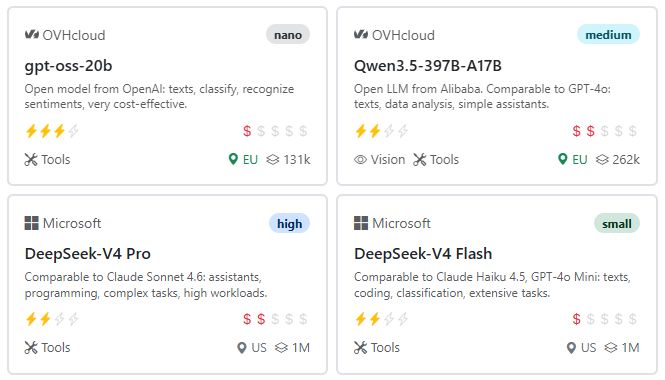
Some hosting providers in Europe also offer open source models. These have two advantages:
Location in Europe: The data is not transferred to the US or other regions, but remains in the EU. This is especially important if your organization’s policies require data to be processed only within the EU.
Cost: Open source models are generally much less expensive than commercial models.
We are currently working with OVHcloud in France to make the open source models GPT-OSS and Qwen available in the AI-Tools.
Microsoft Foundry and Fireworks AI also offer open source models and use their global server infrastructure to provide them. This makes it possible to use Chinese models such as DeepSeek, Kimi, or GLM without having to access the servers of the Chinese providers.
In terms of performance, open source models usually lag a few months behind commercial models, but they can be a good and cost-effective alternative for many tasks.
Thinking#

Most AI models of the newer generation have advanced reasoning. Of course, AI models do not actually think; instead, they simulate thinking by going through multiple internal steps before generating a response. This enables them to handle complex tasks better, draw logical conclusions, and combine information from different sources.
This naturally takes longer and uses more tokens. You need to weigh up for yourself whether the higher cost and longer wait are worth the benefit of better answers.
Controlling thinking#
Sometimes it makes sense to control the thinking budget. For example, in a workflow that consists of several sub-steps. You may want to use a powerful model while preventing too many tokens from being consumed by excessive thinking.
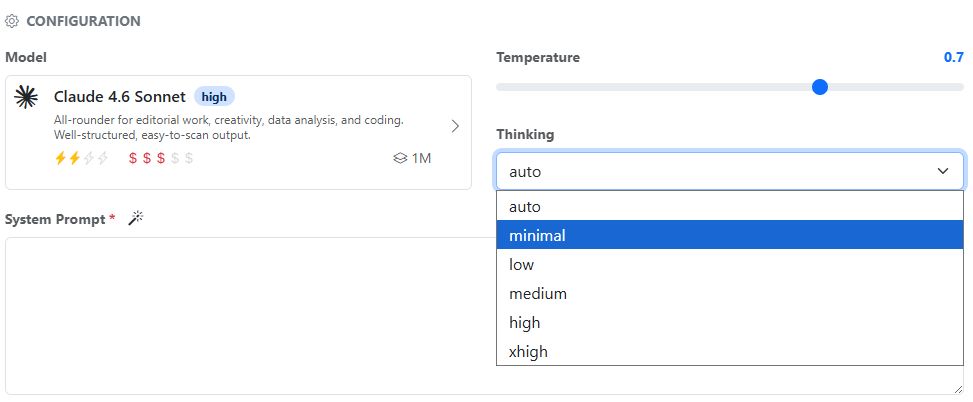
In the settings for assistants and workflows, you will find the Thinking drop-down menu next to the model selection and temperature setting. You can choose between minimal (thinking turned off), low, medium, high, xhigh, and auto.
Not all models support this. For models that do not support the thinking budget, this option is not shown.
If you are unsure, it is best to choose auto. Then the model itself decides how much thinking budget it needs for the task.
Compliance & data protection#
The servers hosting the AI-Tools are located in Limburg, Hesse (Germany). For all AI tasks, your prompts and the responses are sent to the servers of the respective AI providers in the EU or the USA. This is done via a software interface (API), and the data is not used to train the models.
If your organization’s policies require data to be processed only within the EU, you can use the AI models from Microsoft Foundry, Mistral AI, and OVHcloud.
Creating accounts#
To use the AI-Tools, API keys from the various AI providers are required. If you want to use Gemini from Google, Mistral, Anthropic, OpenAI, or Perplexity, you need to create an account with those providers. Your token usage will then be billed through those accounts.
However, you can also use language models without having your own account. In that case, we will set everything up for you, and billing will be handled via your token balance.
OpenAI account#
There are two ways to use OpenAI’s AI models (ChatGPT): either directly via OpenAI in the USA or via Microsoft Azure in Europe (Sweden). You will find the instructions for Microsoft Azure OpenAI further below.
First, create a free account with OpenAI: https://platform.openai.com/signup
Then create the API key for the AI-Tools on the OpenAI platform and send it to the Radio Creator team. The key has this format: sk-1234567890abcdef1234567890abcdef
Verify account for GPT Image#
To use the GPT Image image generator, your account must be verified once. You can do this easily via this link, which takes you to the settings in your OpenAI account:
https://platform.openai.com/settings/organization/general
Click “Verify Organization”. After that, it may take up to 15 minutes for GPT Image to be enabled.
Microsoft Foundry (Azure OpenAI)#
Unfortunately, setting up language models with Microsoft is a bit cumbersome. However, the Foundry portal offers a wide range of models, many of which are hosted in Europe (Sweden). Your administrator can help you, and if you run into any problems, please contact the Radio Creator team.
First, you need a Microsoft Azure account. There, you need to create a new resource: https://learn.microsoft.com/de-de/azure/foundry/tutorials/quickstart-create-foundry-resources?tabs=azurecli
You can then select and deploy AI models in the Foundry portal: https://learn.microsoft.com/de-de/azure/foundry/foundry-models/how-to/deploy-foundry-models
Be sure to select the Europe/Sweden Central region so that data processing takes place within the EU.
Once the models have been deployed, they still need to be enabled for the AI-Tools. The Radio Creator team will set this up for you. Please send them the names of the deployed models and the API key.
Please also send the API endpoint. You can find it in the overview of the deployed models in the Foundry portal. It has this format: https://RESSOURCENAME.openai.azure.com/openai/v1/
Anthropic account#
Former OpenAI employees founded the company Anthropic in the US state of Delaware. They developed the Claude models. Their performance is comparable to OpenAI’s.
Create an Anthropic account: https://console.anthropic.com/
In the console, create a key under API keys and send it to the Radio Creator team. The key has this format: sk-ant-api12-3456…
Google account#
Google’s Gemini models are currently among the most powerful LLMs. They can use Google AI Search to retrieve information from the internet.
To use Gemini and Google AI Search, you need an API key. You can find the instructions here: https://ai.google.dev/gemini-api/docs/api-key?hl=de
Create an API key in Google AI Studio: https://aistudio.google.com/app/apikey
IMPORTANT: Make sure to use the paid plan. Only then will your data not be used for training purposes. In Google AI Studio, you can select the plan for each API key.
Mistral account#
In Europe, Mistral AI is a leader in large language models (LLMs). Its founders were previously researchers at Meta and Google. In addition to open-source models such as Mistral Small, Mistral also offers commercial models.
Codestral is a model trained specifically for programming tasks. It can process 256k tokens. The large reasoning model Mistral Large is well suited for complex tasks. Its performance in “thinking” and using tools is slightly below Anthropic and OpenAI.
A major advantage of Mistral AI is that its servers are located in Europe. Data processing takes place within the EU.
Create a Mistral account: https://console.mistral.ai/
In the console, create a key under API keys and send it to the Radio Creator team.
Perplexity account#
The startup from San Francisco combines a language model with a search engine. Perplexity uses its own crawler for this, called Perplexitybot, which regularly scans the internet.
These language models have reasoning capabilities, meaning they first consider how to approach a task. This makes Perplexity excellent for research.
The most advanced model in this regard is Sonar Deep Research. It can carry out extensive research and takes 5-10 minutes to do so.
Billing is based on tokens and searches. One or more searches may be performed per task.
Create a Perplexity account: https://docs.perplexity.ai/guides/getting-started
AssemblyAI account#
AssemblyAI offers AI models for the transcription of audio files. These models are used, for example, for transcription in the AI-Tools.
AssemblyAI’s AI is also required for automatic cutting in the AI-Tools. It provides particularly precise timestamps for the cuts and can transcribe word for word.
Create an AssemblyAI account: https://www.assemblyai.com/dashboard/signup
Costs and credit#
While you use the AI-Tools, costs are incurred with various providers. AI usage is usually measured in tokens. One token corresponds to about 4 characters of text or 0.75 words.
A distinction is made between input tokens (the prompts you enter) and output tokens (the AI’s responses).
Some models also have so-called reasoning tokens. These are used when the AI “thinks”. There are also citation tokens, which are used to cite sources.
In addition, tools such as Google AI Search or Google Maps are billed separately.
And the cost of each language model varies depending on its capabilities:
Anthropic: https://platform.claude.com/docs/en/about-claude/pricing
Google Gemini: https://ai.google.dev/gemini-api/docs/pricing?hl=de
Mistral models: https://mistral.ai/pricing/#api
Perplexity: https://docs.perplexity.ai/getting-started/pricing
AssemblyAI: https://www.assemblyai.com/pricing
Microsoft Foundry: https://azure.microsoft.com/en-us/pricing/details/ai-foundry-models/deepseek/
OVHcloud: https://www.ovhcloud.com/en-gb/public-cloud/ai-endpoints/catalog/
View usage#
You can view the current usage of the AI models in the AI-Tools at any time. To do this, click the three-dot menu next to the chat input and select View usage.
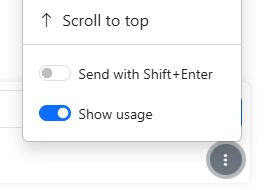
You will then see the number of tokens used and the costs in euros on the left-hand side. On mobile devices, the cost pills are shown above the chat window.
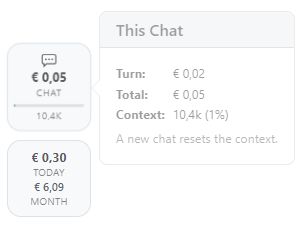
Once a certain usage level is reached, the cost pills appear automatically so you can keep track of things.
Current chat#
The costs incurred by the current chat so far are shown in the chat pill. Click it to see more details:
Turn: Cost of the last prompt you sent.
Total: Cost of the entire chat, including all prompts and responses so far.
Context: Number of tokens currently in the chat that are repeatedly sent to the AI. The percentage shows how full the model’s context window already is. The fuller the context window, the slower the AI becomes and the less accurate the responses are.
Tip
If you have a long chat, it’s better to start a new one. If you need the context from a previous chat, ask the assistant to summarize the most important information and copy it into a new chat.
Current costs#
In the cost pill, you can see the costs incurred by your AI usage today and in the current month.
These two indicators help you improve your prompts and assistants.
Using language models with credit#
If your organization does not have its own account with an AI provider, you can still use the language models. We will set up these models for you, and billing will be handled via your token balance.
Example: Your organization does not have its own account with Google. You can still use Google AI Search and Google Maps for research. Billing for this will be handled via your token balance.
We charge according to the providers’ official rates and add a 20 percent service fee for administration. You can find out more about credit and billing in the section Credit and billing.