

Analyze Website Data with Matomo#
What is Matomo?
Matomo (formerly known as Piwik) is an open-source web analytics platform that works similarly to Google Analytics. With Matomo, you can track:
How many visitors your website has
Which pages are the most popular
Where your visitors come from (Google, social media, direct visits, …)
Which devices they use (desktop, smartphone, tablet)
When most visitors arrive
Why is this useful?
The AI can retrieve, analyze, and visualize your Matomo data. Instead of clicking through Matomo yourself and interpreting the data, you can simply ask the AI questions such as: “Which articles performed best last week?” or “Show me how our homepage developed over the last month.”
The AI understands your questions, retrieves the relevant data, and presents it clearly with charts and summaries.
What are the benefits?
Saves time: No more tedious clicking through Matomo menus
Fast insights: The AI identifies trends and unusual patterns
Better decisions: Data-driven editorial planning
Automated reports: Can be combined with PDF or Excel export
Overview of Features#
The Matomo tool gives you access to the most important analytics features:
Available websites: Lists all websites stored in your Matomo account
Page metrics: Top pages with pageviews, bounce rate, and time on page
Trend over time: How has a page developed over days, weeks, or months?
Time series: Overall website development over a selected period
Traffic sources: Where do your visitors come from?
Devices: Desktop, mobile, or tablet?
Hourly traffic pattern: At what times of day is traffic highest?
Live data: How many visitors are online right now?
How to Activate the Matomo Tool#
Important
To make the AI use the Matomo tool, you need to mention Matomo explicitly in your prompt.
Examples of prompts that activate it:
“List all websites I can access via Matomo.”
“Ask Matomo how many visitors we currently have.”
“Use Matomo to retrieve the top 10 articles from last week.”
“Show me the Matomo data for FFH.de.”
“Analyze the traffic sources with Matomo.”
Tip
Also mention the website in your prompt if you have multiple websites in Matomo. For example: “Ask Matomo for the most popular pages on FFH.de.”
If you do not mention the website, the AI will ask follow-up questions or show you a list of your websites.
Top Pages and Page Metrics#
What is this?
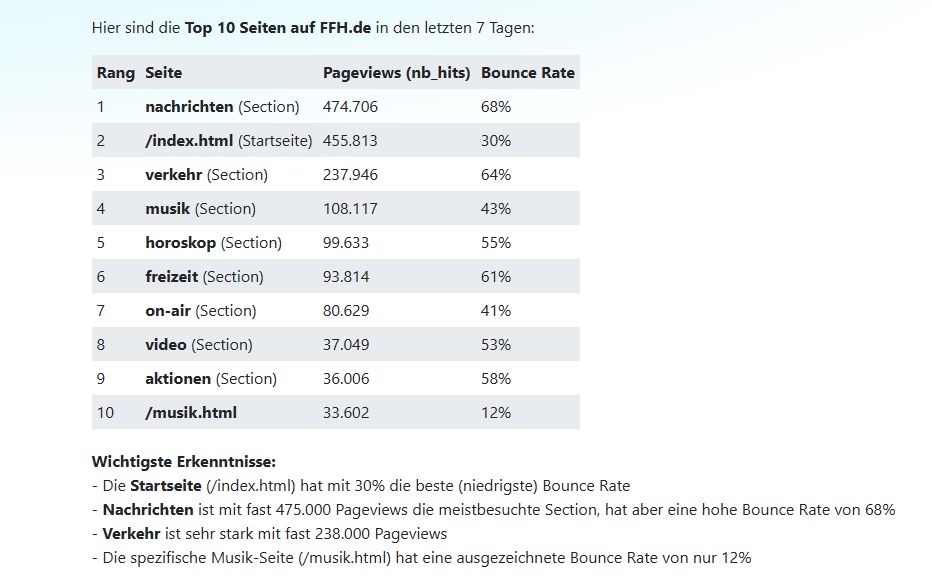
Page metrics correspond to the Matomo feature Behavior → Pages. The AI can retrieve the following metrics:
Pageviews: How often was a page viewed?
Unique Pageviews: How many different visitors viewed the page?
Bounce Rate: How many visitors left the page immediately?
Time on page: How long do visitors stay on the page?
The AI can also expand individual sections to drill down into the page structure in more detail (for example, all subpages within a directory).
Typical use cases
As an online editor, you may want to know:
Which articles are performing well?
Which topics are readers currently interested in?
Which pages have a high bounce rate?
Which sections of the website are particularly successful?
Tip
Try this prompt:
Ask Matomo for the top 10 pages on FFH.de from the last 7 days. Show me pageviews and bounce rate.
More prompt examples:
“Which articles performed best yesterday?”
“Show me the 20 most popular pages from last month.”
“Which pages in the /sport/ section have the most views?”
“List the articles with the longest time on page.”
Note
The AI can also make comparisons: “Which articles performed better this week than last week?”
Trends Over Time for Individual Pages#
What is this?
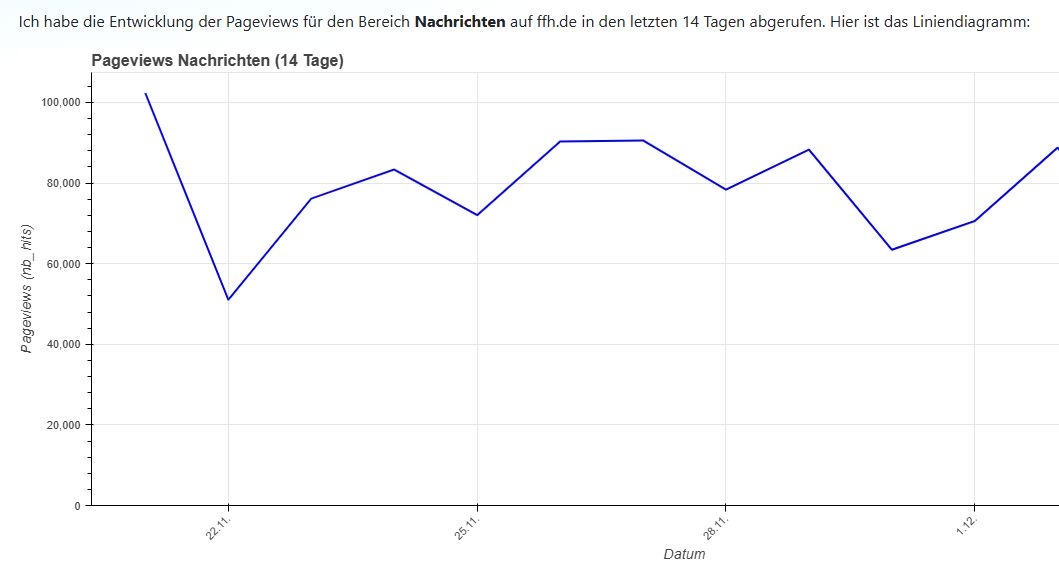
This feature corresponds to Row Evolution in Matomo. The AI can retrieve and analyze the development over time for a single page or a directory across days, weeks, or months.
Why is this useful?
You can see:
How does an important article develop over time?
When were there traffic spikes?
How sustainable is an article’s traffic?
Are there recurring patterns?
Tip
Try this prompt:
Ask Matomo for the pageview trend of the News section over the last 14 days. Create a line chart.
More prompt examples:
“How did our homepage develop over the last month?”
“Show the traffic trend for our article about the FIFA World Cup.”
“Analyze the last 30 days for the /podcast/ section.”
“Were there any spikes for the article about the city festival?”
The AI automatically creates charts and can comment on unusual patterns, for example: “There was a noticeable increase in traffic on December 1.”
Website Development Over a Period of Time#
What is this?
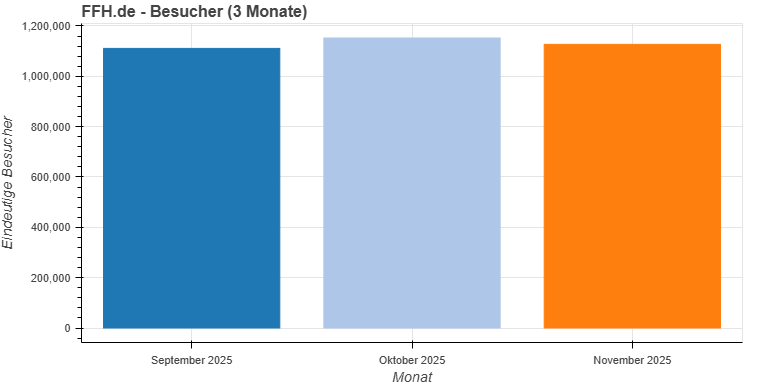
With the time series feature, you can retrieve the overall development of your website over a specific period. This is ideal for:
Month-over-month comparisons
Year-over-year comparisons
Trend analysis
Reports for managers
Typical questions:
How many visitors did we have this month compared to last month?
How are traffic numbers developing overall?
Are there seasonal fluctuations?
Tip
Try this prompt:
Retrieve the Matomo data for FFH.de from the last 3 months. Show visitor development as a bar chart and explain any notable patterns.
More prompt examples:
“How did pageviews develop over the last quarter?”
“Compare the visitor numbers for November and December.”
“Show me the website’s development over the last 12 months.”
“Was there a traffic drop in October?”
Note
Add context: The AI can also retrieve public holidays and school holidays to better explain traffic fluctuations. Simply ask: “Also consider public holidays and school holidays in Hesse in the analysis.”
Analyzing Traffic Sources#
What is this?
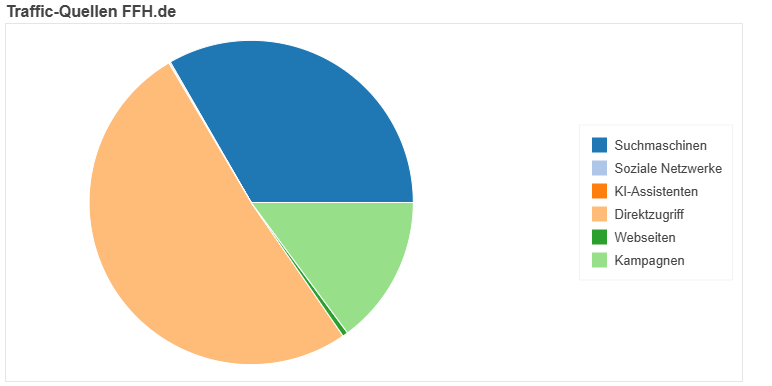
Traffic sources show where your visitors come from. In Matomo, this feature is called Referrers. The main categories are:
Search engines: Google, Bing, DuckDuckGo, …
Social media: Facebook, Twitter, Instagram, TikTok, …
Direct traffic: Visitors who type in your URL directly or come from bookmarks
Websites: Referrals from other websites
AI search: ChatGPT, Perplexity, and other AI-Tools
Why is this useful?
You can identify:
Which marketing channels are working?
Is your social media work paying off?
How well do you rank in search engines?
Which external sites are linking to you?
Tip
Try this prompt:
Ask Matomo for the traffic sources of FFH.de over the last 7 days. Create a pie chart.
More prompt examples:
“How much traffic comes from search engines?”
“How many visitors come from AI search engines such as Perplexity?”
“Compare the traffic sources from this week and last week.”
Device Analysis#
What is this?
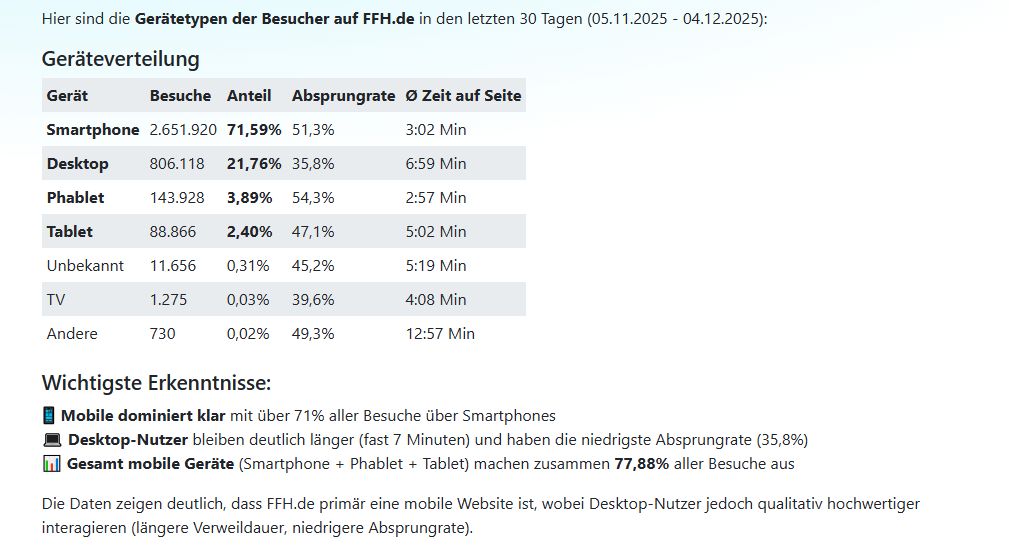
Device analysis shows which device types your visitors use to access your website:
Desktop (computer, laptop)
Smartphone (mobile)
Tablet
Why is this useful?
This data helps you decide:
How important is mobile optimization?
Which screen sizes should we optimize for?
Is user behavior different between desktop and mobile?
Tip
Try this prompt:
Ask Matomo which devices our visitors use on FFH.de. Show the distribution for the last 30 days.
More prompt examples:
“How many visitors come from smartphones?”
“Has mobile usage changed compared to last year?”
“Show the device distribution as a bar chart.”
Hourly Traffic Pattern#
What is this?
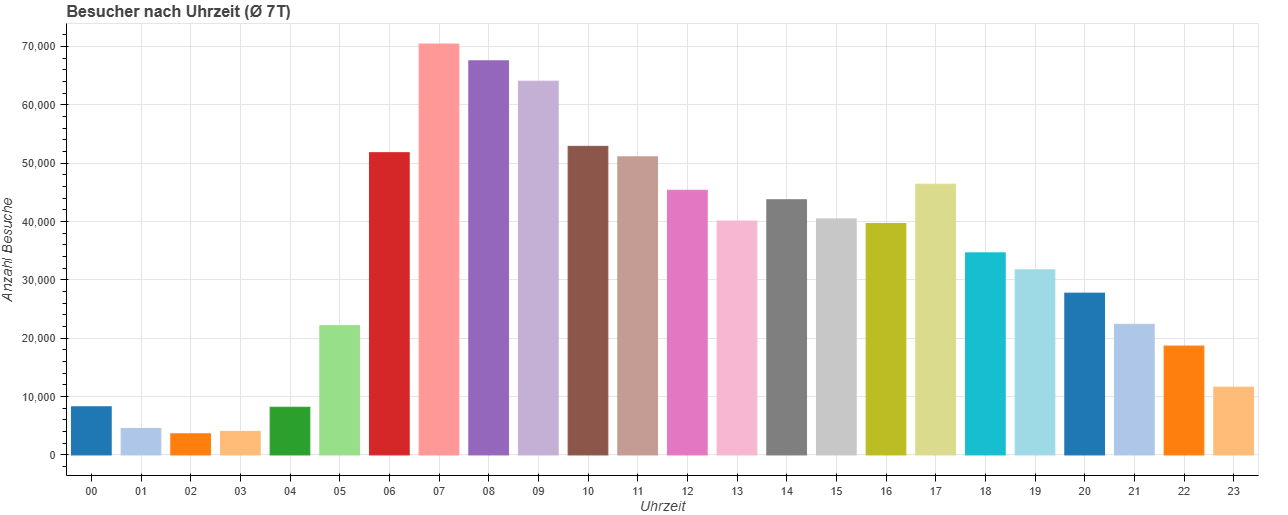
This feature shows at what times of day most visitors come to your website. It is ideal for planning:
Publishing times
Social media posts
Newsletter sends
Why is this useful?
You can optimize your content strategy:
When do we reach the most readers?
Is there a “prime time” for our website?
Are weekdays and weekends different?
Tip
Try this prompt:
Ask Matomo at what times of day FFH.de has the most visitors. Show the average daily pattern of the last 7 days as a bar chart.
More prompt examples:
“When do we have the most visitors?”
“At what time should we send our newsletter?”
“Are there differences between weekdays and weekends?”
“Analyze the daily traffic pattern over the last 30 days.”
Live Data: Who Is Online Right Now?#
What is this?
With live data, you can see in real time how many visitors are currently on your website. This is especially useful for:
Breaking news
Live events
Product launches
Campaign monitoring
Why is this useful?
You can immediately see whether an article is taking off or a campaign is gaining traction.
Tip
Try this prompt:
Ask Matomo how many visitors are currently on FFH.de.
More prompt examples:
“How many users are online right now?”
“Show me the live visitor numbers.”
“Is our newly published article getting off to a good start?”
Combining It with Other Tools#
The Matomo tool can be combined very effectively with other tools:
Creating Charts#
The AI can automatically visualize Matomo data:
Line charts for trends over time
Bar charts for rankings and comparisons
Pie charts for distributions (e.g. traffic sources)
Just mention it in your prompt: “Create a line chart” or “Show this as a bar chart”.
Export as PDF, Word, or Excel#
You can export analyses directly:
Tip
Try this prompt:
Create a report on the top 20 articles from last week with pageviews and bounce rate. Export the result as a PDF on business letterhead.
More export examples:
“Export the traffic sources as an Excel file.”
“Create a monthly report as a Word document.”
“Save the analysis as a PDF.”
Adding Context with Public Holidays and School Holidays#
The AI can retrieve public holidays and school holidays to better explain traffic fluctuations:
Tip
Try this prompt:
Analyze the Matomo data for FFH.de in November. Take public holidays and school holidays in Hesse into account and explain any notable patterns.
Calculations and Comparisons#
The AI can use the calculator tool to perform calculations:
Percentage changes
Averages
Growth rates
Projections
“What percentage increase in visitors did we have this month compared to last month?”
Tips for Meaningful Analyses#
1. Choose sensible time periods
For current trends: last 7 days
For month-to-month comparisons: full calendar months
For yearly trends: 12 months
2. Ask specific questions
Instead of: “Show me Matomo data”
Better: “Which 10 articles had the longest time on page last week?”
3. Add context
Mention the website
Specify the time period
Explain what you want to know
4. Use visualization
Ask for charts - they make trends visible immediately.
5. Make comparisons
This week vs. last week
This month vs. last month
Weekdays vs. weekends
Example Workflows from Everyday Editorial Work#
Morning Briefing#
Tip
Prompt to start the editorial day:
Good morning! Ask Matomo for yesterday’s top 5 articles on FFH.de. Show pageviews and time on page. Which topics performed particularly well?
Weekly Report#
Tip
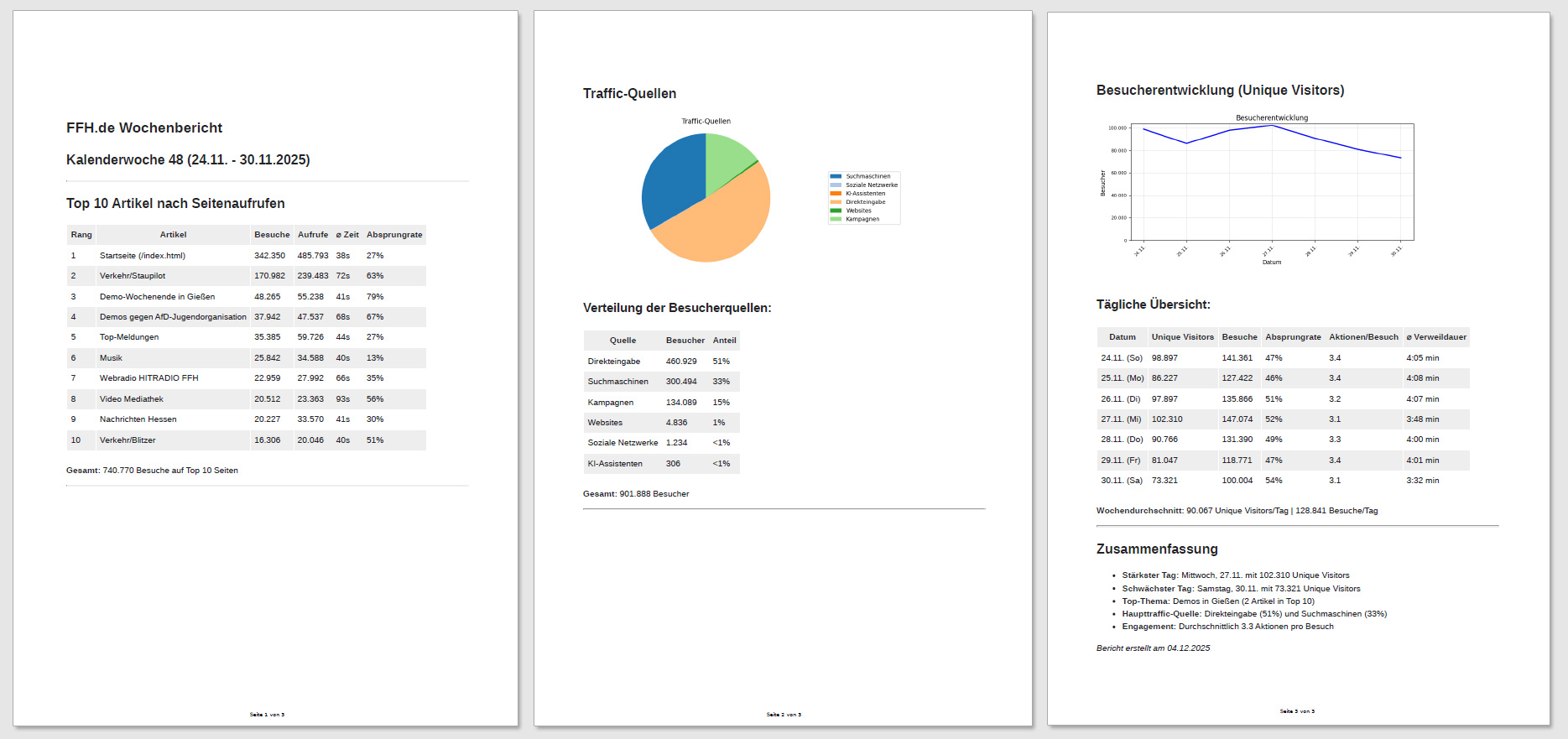
Prompt for the weekly review:
Create a report on the last week for FFH.de. Retrieve the Matomo data and show: - Top 10 articles by pageviews - Traffic sources as a pie chart - Visitor trend as a line chart Export everything as a PDF.
Topic Analysis#
Tip
Prompt for content strategy:
Analyze all articles in the /lifestyle/ section from the last 30 days. Which topics are performing particularly well? Which ones have high bounce rates?
Investigating a Traffic Drop#
Tip
Prompt for problems:
Visitor numbers are lower than usual this week. Analyze the Matomo data from the last 14 days and compare it with previous weeks. Also check whether public holidays or school holidays might be playing a role.
Comprehensive Analyses#
If you want to understand your website holistically, choose a powerful language model that is capable of performing complex data analyses. Models such as Claude 4.5 Sonnet, GPT-5.1, and Gemini 3 Pro are particularly well suited for this. They can decide for themselves which metrics and visualizations best fit your request and provide you with in-depth insights into your Matomo data.
Make sure all required tools are enabled by mentioning them in your prompt: Matomo, charts, public holidays, school holidays.
Tip
Comprehensive analysis:
Use Matomo to create a comprehensive analysis of FFH.de. Retrieve all relevant data from the past six months and prepare a detailed evaluation including traffic sources, user behavior, and device distribution. Use charts for visualization and take public holidays and school holidays into account. Compare the results with performance in the same period of the previous year. Use the calculator for calculations. Create a complete and well-structured report.
Automating Reports#
Create AI workflows for weekly, monthly, or quarterly reports and have them sent automatically by email to you or your team. In the workflow, you can specify, for example, that the most important results should already be summarized in the email and that the detailed report should be attached as a PDF.
Frequently Asked Questions#
Can the AI access all of my websites in Matomo?
Yes, the AI can retrieve all websites stored in your Matomo account. Just mention the website you want in your prompt.
How far back can I retrieve data?
As far back as you have stored data in Matomo. Usually, that means several years.
Can the AI also compare multiple websites?
Yes! For example, ask: “Compare the traffic numbers of FFH.de and planetradio.de over the last month.”
Is the Matomo data stored?
The AI retrieves the data in real time and does not store it permanently. For reports, you can export the results as PDF, Word, or Excel.
What if the AI analyzes the wrong website?
Mention the website explicitly in your prompt: “Analyze the data for FFH.de.”
Can I run multiple analyses at once?
Yes! For example: “Create a comprehensive report with top pages, traffic sources, device distribution, and trend over time for the last week.”
Try It Now!#
The Matomo tool makes data analysis as easy as having a conversation. Instead of clicking through menus, you simply ask questions in natural language.
Tip
Start with this simple prompt:
Ask Matomo for the top 10 pages on [YOUR-WEBSITE] from the last 7 days. Show pageviews as a bar chart and explain which topics are performing well.
Good luck with your analyses! 🚀