
Directories#
Several directories need to be set up on the server. If you choose the Radio Creator SFTP server, we will do this for you. The main directories are:
planner - Music scheduling
scheduler - Broadcast schedules
dbexport - Exchange with Zenon’s DBExport tool
planner#
The planner directory contains all files from your music scheduling system (for example, MusicMaster). You can create subfolders for the music pools of individual channels.
planner/00_FFHplus
planner/01_Rock
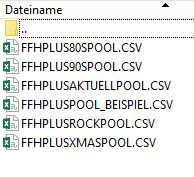
The export files from the music scheduling system are then placed in these folders. Here, for example, are the music pools for FFHplus:
If you also use the Simulcast Replacer, we also need a daily directory where all daily exports from the music scheduling system are stored. This allows the Replacer to prepare music tracks for replacement in advance.
planner/daily
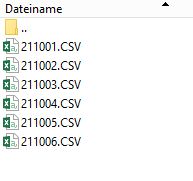
The export date is included in the file name:
Once you have defined all directory names, please enter them in the Radio Creator settings as well. This tells the system where to find everything.
You can find details about the structure of the CSV exports in the article MusicMaster Export.
Note
The Radio Creator frontend is still under development. Until the self-service interface is ready, we will handle all settings for you.
scheduler#
The scheduler directory contains the current broadcast schedule from the playout system, provided you are using the Simulcast Replacer module. The Replacer continuously analyzes the schedule and identifies positions in the hourly clock where a track replacement is possible and makes sense.
To ensure the Replacer can detect current changes to the broadcast schedule - for example, if the presenter swaps tracks or shifts program slots - the schedule must be uploaded continuously. We synchronize the file once every minute.
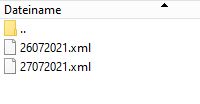
In the Zenon playout system, the current broadcast schedule is stored as an XML file. The broadcast date is included in the file name:
DDMMYYYY.xml For example, 26072021.xml for July 26, 2021
dbexport#
Now we also need all audio files and the metadata for the individual music tracks and other program elements. The required metadata includes, for example, cue points such as Ramp, Startnext, and Cueout. With this information, Radio Creator can mix the music perfectly.
In the Zenon playout system, the DBExport module is used to provide this data. It works with two directories:
Radio Creator writes to the Upload directory to specify which elements it needs information and audio files for.
DBExport retrieves the data and makes it available in the Download directory.
planner_id and audio_id#
The music scheduling system and the playout system generally use their own IDs for individual program elements. Both are merged in the playout system.
We name these IDs after the system they come from: The planner_id comes from the music scheduling system. In MusicMaster, this is the MusicMaster ID or simply ID.
The playout system manages the audio_id. In Zenon, this is NUM_ROTATION.
Radio Creator must be able to retrieve metadata and audio from the playout system for both types of IDs. This is why it is necessary to run two instances of Zenon DBExport: one for requests using the planner_id (ID) and one for the audio_id (NUM_ROTATION). This is configured in the DBExport module settings.
This results in two directory pairs:
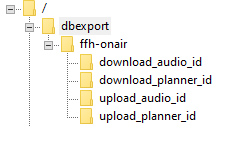
Some broadcasters work internally with multiple music databases, for example to separate Simulcast scheduling from web channel scheduling. In Radio Creator, you can identify each database with its own db_key. That is why, in the directory tree, each upload/download pair sits inside a parent directory named after the corresponding db_key. Of course, you can also work with just one database.
In our example, the db_key is called “ffh-onair”.
You can find out how to set up Zenon DBExport for Radio Creator in the article Zenon DBExport.